Features/Hear from users

In-app widget

One script tag. Everything your users need.

Feedback and bug reports, support chat with Quanta, your roadmap, changelog and help centre, popups and surveys, on every page of your product and styled to your brand.

1
script for the widget, analytics and surveys
12
platforms with ready snippets
6
animated header styles

A user finds a bug, looks for a way to tell you, finds nothing, and quietly leaves.

Now every page has a way to talk to you.

01

Install in minutes, on any stack.

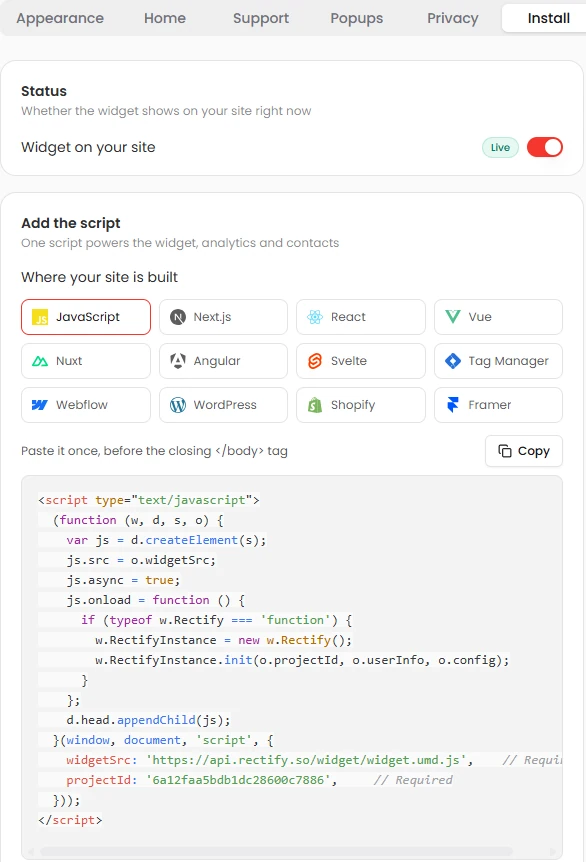
Paste one async script tag. The dashboard has copy-paste snippets for JavaScript, Next.js, React, Vue, Nuxt, Angular, Svelte, Google Tag Manager, Webflow, WordPress, Shopify and Framer. The widget runs in its own container, so your site’s styles never leak in.

Widget install: pick your platform and copy the script
02

Make it yours.

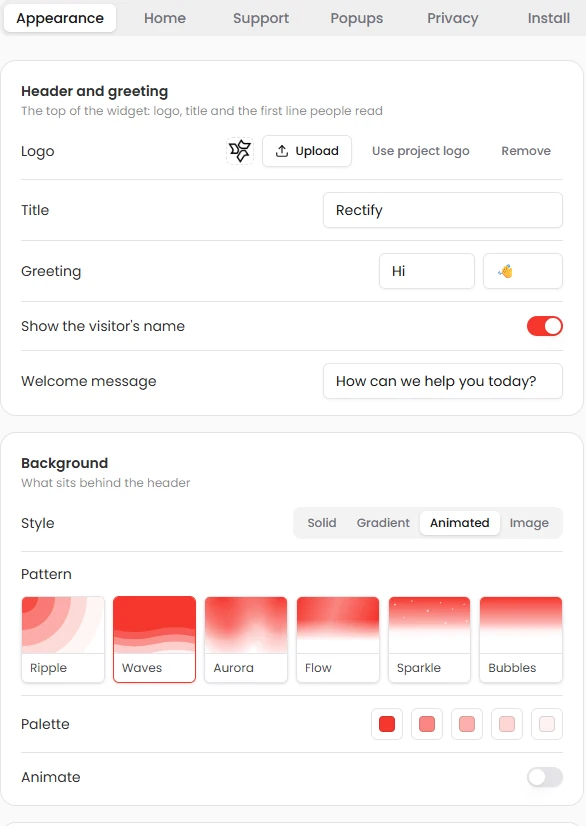
Your logo, a greeting with the visitor’s name, your colours and corners. Pick a solid, gradient, image or animated header: Ripple, Waves, Aurora, Flow, Sparkle or Bubbles. Choose the launcher’s style, position and icon, reorder the tabs, or hide the launcher and open the widget from your own button.

Widget appearance: header, greeting and animated background patterns
03

Reports that arrive complete.

Report a Bug, Share an Idea, General Feedback and testimonials, each with its own form you can edit. Users attach screenshots with built-in markup, or a Loom recording. Bug reports carry a replay, console logs and network requests automatically.

04

Popups that start conversations.

Short messages from Quanta or a teammate, with quick replies that open the chat. Target by segment, page, device, or new and returning visitors. Show them after a delay, on scroll, on exit, or when someone shows frustration like rage clicks.

fieldnote.app/pricing

Rage clicks on /pricing

Quanta

Stuck? Ask me anything about our plans.

Compare plansTalk to a person
05

Verified users, private by default.

Identify signed-in users so forms are prefilled. Secure mode signs each user ID on your server, so nobody can post as someone else. Turn recording and log capture on or off, mask text and inputs, and passwords are always masked.

HMAC

signed identity in secure mode

Mask all textMask inputsPasswords always maskedBlock elements by class

Ask Quanta

Don’t click through it. Just ask.

Ask in plain English and Quanta does the work. Anything that changes your data waits for a person to approve it.

QuantaOn shift

Make the widget match our brand.

Your logo, red #F5362C, the Waves header and the launcher bottom right. Here’s the preview before it goes live.

Waiting for your approvalApply changesCancel
Ask Quanta to do anything

Everything in it

The details, all of them.

Three stylesRound button, edge tab or pill
Four positionsBottom or middle, left or right
Your iconPresets or any icon, your colours
Hide itOpen the widget from your own button
DraggableVisitors move it, it remembers
UnreadBadge, tab title count, favicon dot and sound

Give your SaaS its first hire.

Free for 14 days. Set up in about two minutes.