Features/Hear from users

Bug reports and feedback

Bug reports that explain themselves.

Every report from your widget arrives with a session replay, console and network logs, the steps they took and their browser. Quanta reads it all and tells you what broke.

4
kinds: bug, idea, general, testimonial
Replay
and logs on every bug report
1 click
to triage with Quanta

“It’s broken.” No steps, no browser, no screenshot. Just a frustrated customer and an evening of guessing.

With Rectify, the report already holds the answer.

01

Everything you need to reproduce it.

Bug reports carry a replay of the last few minutes, console logs, network requests and user actions. Browser, OS, page, screen size and country are captured automatically. Users can add a rating, screenshots, a Loom video and a file.
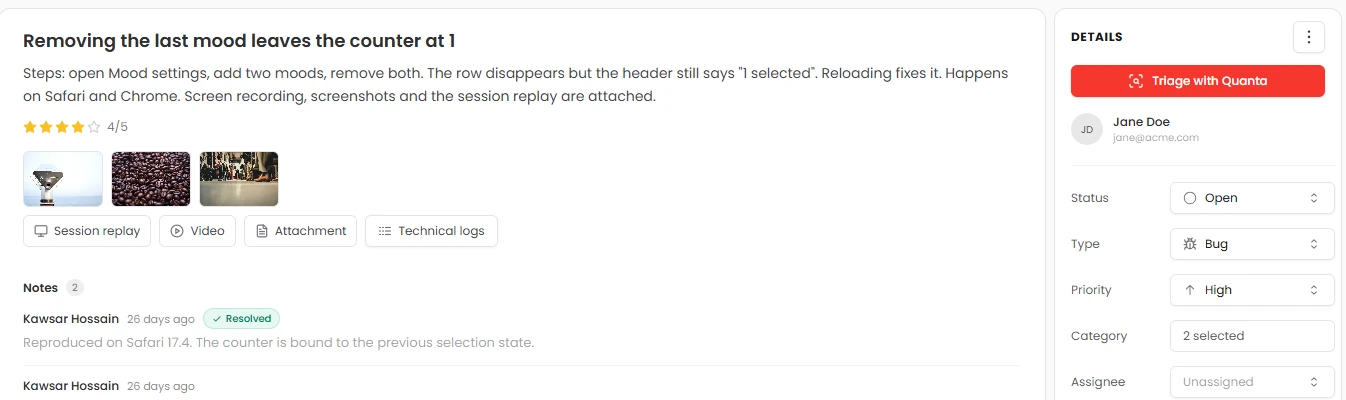

A bug report with steps, rating, screenshots, session replay and technical logs
02

Every replay, one click away.

A Sessions page lists every report with a replay, who sent it, where from, their browser and how many events were recorded. Press play and watch exactly what happened, next to a timeline of every click and error.

Feedback sessions: reporter, location, browser and replay for each report
03

A calm inbox for every report.

Set the status and priority, assign a teammate, add internal notes and move reports between projects. Filter by type, status, priority, category and date. Reply in the reporter’s support chat, or invite them into one with a click.

FeedbackType: BugPriority: High+
●Removing the last mood leaves the counter at 1OpenIn progressUL
●Invoice PDF opens blank in SafariOpen
●Save button disabled after editing a note twiceUnder review

Internal note

Reproduced on Safari 17.4. Fix is in review. Reporters never see notes.

04

Then Quanta takes it from there.

Ask Quanta about any report, including what happens in its replay. Triage with Quanta gives you severity, a root-cause guess with its confidence, the suspect files in your GitHub repo and steps to reproduce. Fix with Quanta goes one further and opens a draft pull request.

See Fix with Quanta
Triage reportReading logsReady

Removing the last mood leaves the counter at 1

Severity: HighPriority: P1Code change needed
Root cause

The row is removed, but the selected IDs are never cleared, so the header still counts one.

Confidence0%
Evidenceselection.size === 1 after onRemove(id)
Suspect files

src/components/MoodList.tsxonRemove()

src/state/selection.tsclearSelection()

Steps to reproduce
  1. Open Mood settings
  2. Add two moods, remove both
  3. The header still says “1 selected”

Ask Quanta

Don’t click through it. Just ask.

Ask in plain English and Quanta does the work. Anything that changes your data waits for a person to approve it.

QuantaOn shift

Why does the counter stay at 1?

The row is removed but the selection isn’t cleared. Likely in MoodList.tsx, in the onRemove handler (high confidence). Three steps to reproduce are attached.

Ask Quanta to do anything

Everything in it

The details, all of them.

Four kindsBug, idea, general, testimonial
RatingsFrom 1 to 5
AttachmentsScreenshots, Loom video and a file
Session replayWith console, network and actions
Auto contextBrowser, OS, page, screen, country
TriageStatus, priority, owner, notes
FiltersType, status, priority, category, date
ReplyIn the reporter’s support chat
Ask QuantaAbout any report and its replay
Send it onGitHub, Jira, Linear, Slack and more

Give your SaaS its first hire.

Free for 14 days. Set up in about two minutes.