Features/Tell them what changed

Help centre

A help centre that writes itself.

Bring your docs over in minutes. Quanta answers customers from them with sources, spots the questions nobody has answered yet, drafts the articles you’re missing and translates them for you.

Sources
on every AI answer
Gaps
the questions nobody has answered
llms.txt
so AI assistants can read your docs

Customers ask the same five questions every week. The answers live in a doc nobody can find, in a language half of them don’t read.

Quanta finds the answer, writes the ones you’re missing, and translates the rest.

01

Customers get real answers.

Ask Quanta streams an answer built only from your articles, with numbered sources, and says so when nothing matches instead of guessing. Search understands keywords and meaning, with popular and related articles, breadcrumbs, a table of contents and “Was this helpful?” on every page.

HelpAsk Quanta

Answer

Open Feedback, pick the reports you want or select all, then choose Export and CSV. The file includes the status, priority and reporter of each one. 12

Sources

1Export your feedback to CSV

2Bulk actions in the feedback inbox

Was this helpful? 👍 👎Still stuck? Chat with us
02

Gaps show you what to write next.

Rectify groups unanswered support questions, searches with no results and Ask Quanta misses into clusters, each with a Write article button. Quanta drafts the article from the conversations behind it, ready for you to review.

GapsQuestions nobody has answered
How do I export to CSV?

14 support chats · 6 empty searches

Write articleDrafting…✓ Draft ready
Change my billing email

9 searches with no results · 3 Ask Quanta misses

Write articleDrafting…✓ Draft ready
Do you support SSO?

6 Ask Quanta misses · 2 support chats

Write articleDrafting…✓ Draft ready
03

Know what’s working.

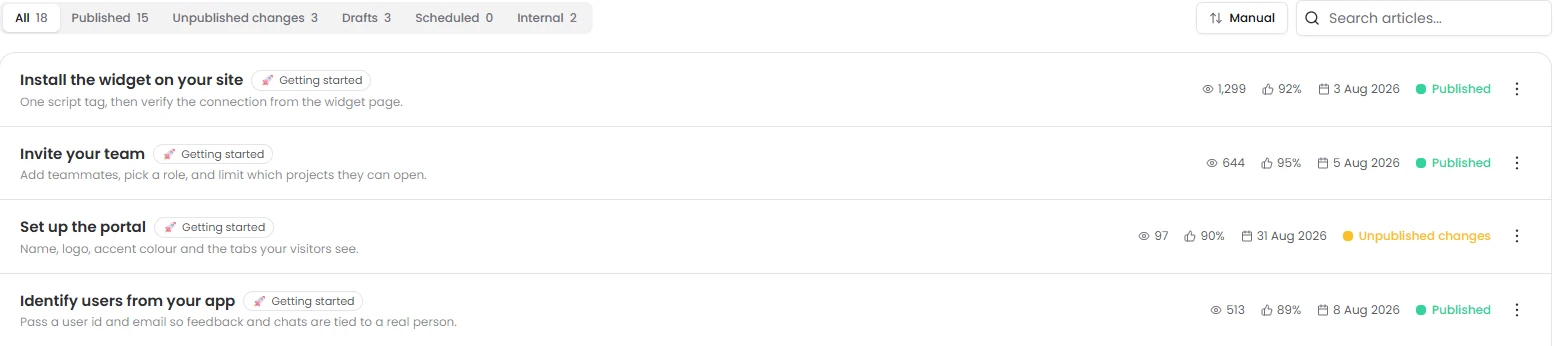
Every article shows its reads and how many people found it helpful. Reads, searches and votes over time, whether they came from the portal or the widget, a list of articles that need improving, the reasons behind unhelpful votes, and how often AI answers cited each article.

Help centre articles with views, helpful votes and publishing status
04

Rich articles, done properly.

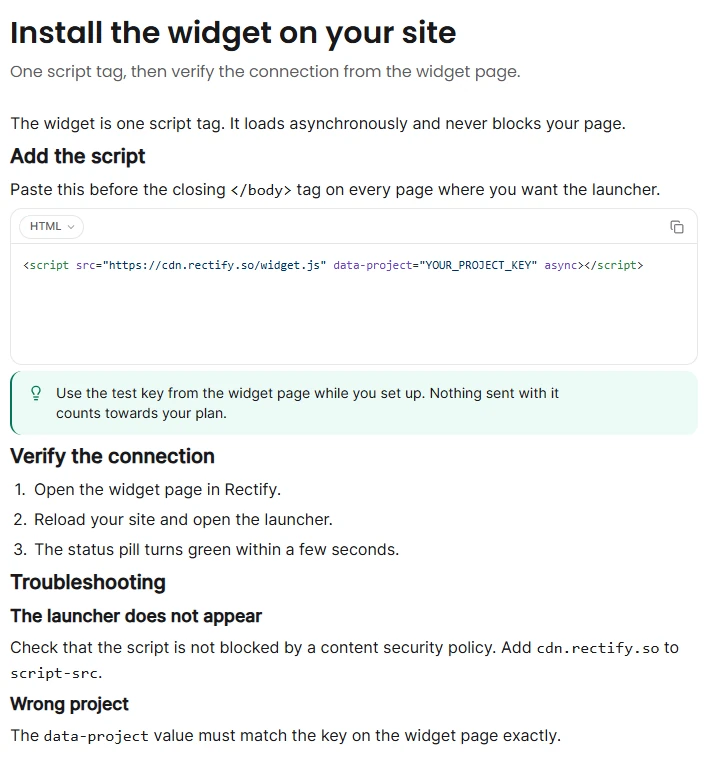
Collections nested three levels deep, with icons and colours. Blocks for callouts, tabbed code, tables, accordions, cards, columns, video and Loom. Edits stay in draft until you publish, with scheduling, a “what changed” note, version history with restore, and an edit lock so nobody overwrites anyone.

An article being edited: install the widget on your site
05

Quanta writes with you.

Write an article from a prompt, a support conversation or a question customers keep asking. Rewrite, shorten or change the tone, or follow your own instructions. Generate the summary and search fields in a click.

Write

from a prompt, a chat or a gap

WriteRewriteShortenChange toneDescribeSearch fields
06

Every language, approved by you.

Quanta drafts translations, on demand or every time you publish, and never translates the words you protect, like your product names. A person approves each one. Visitors switch language, search engines get the right hreflang tags, and each language has its own landing text.

Export your feedback to CSVPublished
EnglishFrançaisDeutschEspañol

Draft translation by Quanta

Ouvrez Feedback dans Rectify, sélectionnez vos rapports, puis choisissez Exporter et CSV. Quanta peut aussi le faire pour vous.

Rectify and Quanta are protected terms and stay as they are.

Approve translationEdit
07

Move in fast. Found everywhere.

Import from your website, a Markdown zip where folders become collections, or your wiki, and everything arrives as drafts. Export it all as Markdown whenever you like. A sitemap, llms.txt and a Markdown version of every article mean Google, ChatGPT, Claude and Cursor can all read your docs, on your own domain.

Import from your websitedocs.fieldnote.app

0 pages found · arriving as drafts

Getting startedDraft
Install the widgetDraft
Invite your teamDraft
Connect a custom domainDraft
Export your dataDraft
sitemap.xmlllms.txtllms-full.txtMarkdown for every article

Ask Quanta

Don’t click through it. Just ask.

Ask in plain English and Quanta does the work. Anything that changes your data waits for a person to approve it.

QuantaOn shift

What should we write next?

Three gaps: “How do I export to CSV?” (14 unanswered chats), “Change billing email” (9 searches with no results) and “SSO” (6 Ask Quanta misses).

Ask Quanta to do anything

Everything in it

The details, all of them.

CollectionsNested three deep, with icons and colours
Rich blocksCallouts, tabbed code, tables, accordions, video
DraftsEdits stay private until you publish
SchedulingWith a “what changed” note
Version historyRestore any version
Edit lockAdmins can take it over

Give your SaaS its first hire.

Free for 14 days. Set up in about two minutes.