Features/Hear from users

Support inbox and live chat

Quanta answers first. You step in when it matters.

A shared live-chat inbox for your website. Quanta resolves the easy questions from your docs and hands the hard ones to a person, with the customer’s whole story attached.

3
modes: Quanta first, Quanta only, team only
Live
typing, presence and handover
Push
on the iOS and Android app

Every question lands on you, whether it’s “how do I reset my password?” or “your checkout is broken”.

Quanta takes the first kind, and gets you for the second.

01

AI first, people when it matters.

Choose who answers: Quanta first with handover, Quanta only, or only your team. Quanta answers from your help centre and knowledge base, with links to its sources. When it can’t help, it offers to bring in your team and alerts you by push and email.
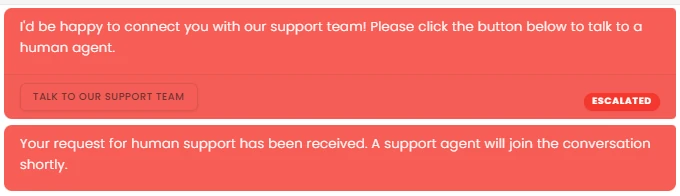

Quanta offers to connect the customer with the support team
02

Reply with superpowers.

Type / to ask Quanta to draft a reply, summarise the conversation, find related feedback or read an attachment. Use @ to bring in a teammate and # to link a feedback item. AI Enhance tidies your draft before you send it.

The reply box: / to ask Quanta, @ to mention, # to link feedback
03

Know who you’re talking to.

Beside every chat: the customer’s profile, location, first contact, earlier conversations and private notes. A Quanta side panel answers questions about this customer and searches their past chats, feedback and requests.

SM
Sofia Marchetti

sofia@fieldnote.io

Customer
CompanyFieldnotePlanLaunchLocationMilanLast seenJust now
3 past chats2 bug reports1 request voted

Ask Quanta about Sofia

Has she hit this before?

Yes. She reported the Safari export bug twice, and voted for Bulk CSV export. Both are linked here.

04

Numbers on demand.

Ask Quanta how support is going: your AI resolution rate, average response time and how often chats go to a person, with a 14-day trend, peak hours and top agents.

AI

resolution rate, whenever you ask

Resolution rateResponse timeHandover ratePeak hoursTop agents

Ask Quanta

Don’t click through it. Just ask.

Ask in plain English and Quanta does the work. Anything that changes your data waits for a person to approve it.

QuantaOn shift

Summarise this conversation.

Sofia can’t export to CSV in Safari. Quanta sent the help article, then she asked for a person. A matching bug report already exists.

Ask Quanta to do anything

Everything in it

The details, all of them.

Join or take overFrom Quanta, at any time
Assign and prioritiseUrgent to None, with email to the assignee
UnreadCounts per filter, badge and sound
AttachmentsImages and documents
Edit and replyTo a specific message
Mentions and links@ teammates, # feedback
AI EnhanceRewrite or fix grammar
Start a chatInvite a customer by email
Operating hoursWith away messages
Offline fallbackEmail when either side is away

Give your SaaS its first hire.

Free for 14 days. Set up in about two minutes.